
Cloud DMA
A Hyper-V environment for one Windows PC with guided installation and encrypted activation.
In short
A Hyper-V environment on one PC
The guided installer sets up the virtual environment and activates the service over an encrypted connection.
Overview
Cloud DMA on one Windows PC
Check Windows, Hyper-V and the separate purchases before ordering.
Cloud DMA runs its virtual environment on your gaming PC. The installer sets up Hyper-V and activates the service over an encrypted connection.
Cloud DMA may require GREENWARD, Static Server and AWS as separate purchases. Check the full requirements and current price at checkout.
Hyper-V setup on one PC
Cloud DMA is described as a Hyper-V virtual environment on a single Windows PC. For the Apex product, it is a required infrastructure dependency for full functionality on supported builds rather than an optional performance add-on.
What you need before checkout
The documentation lists 64-bit Windows 10 or 11, CPU virtualization, Hyper-V support, HVCI, Core Isolation, TPM, Secure Boot, at least 8 GB RAM, and stable broadband. It also identifies GREENWARD, Static Server, and AWS as separate required products. Confirm the current arrangement at checkout.
Included
Cloud DMA features
The lifetime license covers the Cloud DMA infrastructure layer.
- Single-PC setup
- Guided Hyper-V installation
- Encrypted activation
- Lifetime access
Setup
From purchase to activation
Follow the Windows and Hyper-V checks before you run the installer.
Setup
- Layer A
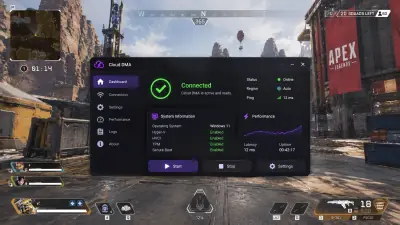
Supplied Cloud DMA interface artwork
Promotional illustration supplied for this product page; it is not verified product documentation.
More products
Pairs well with
Explore the other three products and their setup requirements.
- Apex Legends Cheats Player, weapon, health, distance, box, skeleton, and loot ESP with advertised Advanced Aimbot and No Recoil. View details: Apex Legends Cheats
- HWID Spoofer After a hardware flag, this license rewrites disk serials. It also rewrites MAC addresses, GPU IDs, and related fingerprints. Trace cleanup is in the same license. View details: HWID Spoofer
- Skin Changer A small client paints premium weapon skins on your screen. Outfits and knife variants are included, across the major titles it lists. View details: Skin Changer
FAQ
Questions about this page
Answers for this page. The FAQ page holds the rest.